
Introduction to Kubernetes for DevOps Engineers
In today’s fast-paced software development world, DevOps engineers are expected to manage applications with speed, reliability, and scalability. One technology that has revolutionized how we build, deploy, and operate applications is Kubernetes. If you’re stepping into the world of cloud-native DevOps, understanding Kubernetes is no longer optional — it’s essential.
In this post, we’ll cover what Kubernetes is, why it matters for DevOps engineers, and how you can start leveraging it to boost your DevOps practices.
What is Kubernetes?
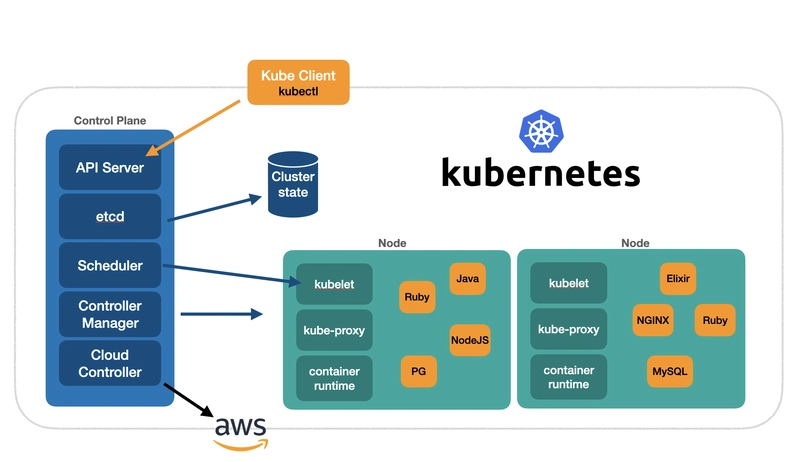
Kubernetes, often abbreviated as K8s, is an open-source container orchestration platform that automates the deployment, scaling, and management of containerized applications. Originally developed by Google and now maintained by the Cloud Native Computing Foundation (CNCF), Kubernetes has become the de facto standard for container orchestration.
Rather than managing individual containers manually, Kubernetes allows you to manage clusters of containers efficiently across a fleet of machines.
Why Kubernetes Matters for DevOps Engineers
1. Automation at Scale
Kubernetes automates routine tasks like deployment, scaling, monitoring, and load balancing. This is a game-changer for DevOps engineers who aim to achieve continuous integration and continuous delivery (CI/CD) efficiently.
2. Infrastructure as Code (IaC)
With Kubernetes, you define your application infrastructure declaratively using YAML or JSON files. This ties perfectly into IaC principles that DevOps engineers use to manage environments more reliably.
3. Improved Deployment Strategies
Kubernetes supports advanced deployment strategies such as blue-green deployments, canary releases, and rolling updates, enabling safer and more reliable application updates.
4. Scalability and High Availability
Need to handle a sudden surge in traffic? Kubernetes can automatically scale your applications up or down based on demand. It also ensures high availability through self-healing capabilities, automatically replacing failed containers or nodes.
5. Multi-Cloud and Hybrid Deployments
Kubernetes abstracts the underlying infrastructure, allowing DevOps teams to run their applications on any cloud provider or on-premises environment, offering flexibility and preventing vendor lock-in.
Key Kubernetes Concepts for DevOps Engineers
Before diving deep, it’s important to get familiar with some basic Kubernetes components:
- Pods: The smallest deployable unit, a Pod can contain one or more containers.
- Services: A way to expose an application running on a set of Pods as a network service.
- Deployments: Define the desired state of Pods and ReplicaSets.
- Namespaces: Logical partitions of cluster resources.
- ConfigMaps and Secrets: Manage configuration data separately from application code.
- Volumes: Persistent storage for your containers.
Getting Started with Kubernetes
If you’re new to Kubernetes, here’s a quick roadmap to get started:
- Learn Docker First: Kubernetes manages Docker containers. Understanding containerization is crucial.
- Set Up a Local Kubernetes Environment: Use tools like Minikube or kind (Kubernetes IN Docker) to practice locally.
- Understand YAML Configurations: Start creating Pods, Services, and Deployments using YAML.
- Explore Kubernetes Tools: Familiarize yourself with kubectl, Helm, and Kustomize.
- Practice CI/CD Integrations: Try setting up a basic GitOps pipeline integrating Kubernetes.
Conclusion
As a DevOps engineer, mastering Kubernetes will empower you to build more resilient, scalable, and efficient systems. It’s not just a nice-to-have skill — it’s a core part of the modern DevOps toolkit. Start small, practice daily, and you’ll soon see the transformative impact Kubernetes can bring to your projects.
Stay tuned for our next post where we dive deeper into hands-on Kubernetes deployments for DevOps pipelines!